Choose colors for signals
OpenLab CDS allows you to adjust the color palette for your signals. Color changes are applied across all windows.
The colors are assigned to the signals based on the signal order number (for example, the 1st or the 2nd signal). You can select different colors for up to 18 signals. The 19th signal will use the same color as the 1st signal.
NOTE
Before changing colors, consider unpinning all pinned injections. Signal order numbers are incremented over all pinned injections. This may lead to unexpected results after unpinning and reloading individual injections.
In the Chromatograms window, select a signal.
Click the color picker in the Chromatograms toolbar.
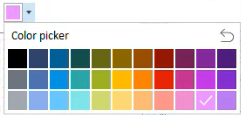
Select a new color.
If the selected color is already in use, the color picker displays a warning. You can still select the color.
All result sets use the same color assignments. If you choose the color for the 2nd signal, the same color is used fo the 2nd signal in all result sets.
To reset all colors to default:
- Click the color picker.
- Select
 .
.
- In the prompt, click Reset.
NOTE
The signal color is a user setting. It remains assigned, even if you close the application and open it again.
base-id: 14324012171
id: 14324012171