Edit an SS420x method
Activate the Acquisition Method ribbon and select the SS420x.
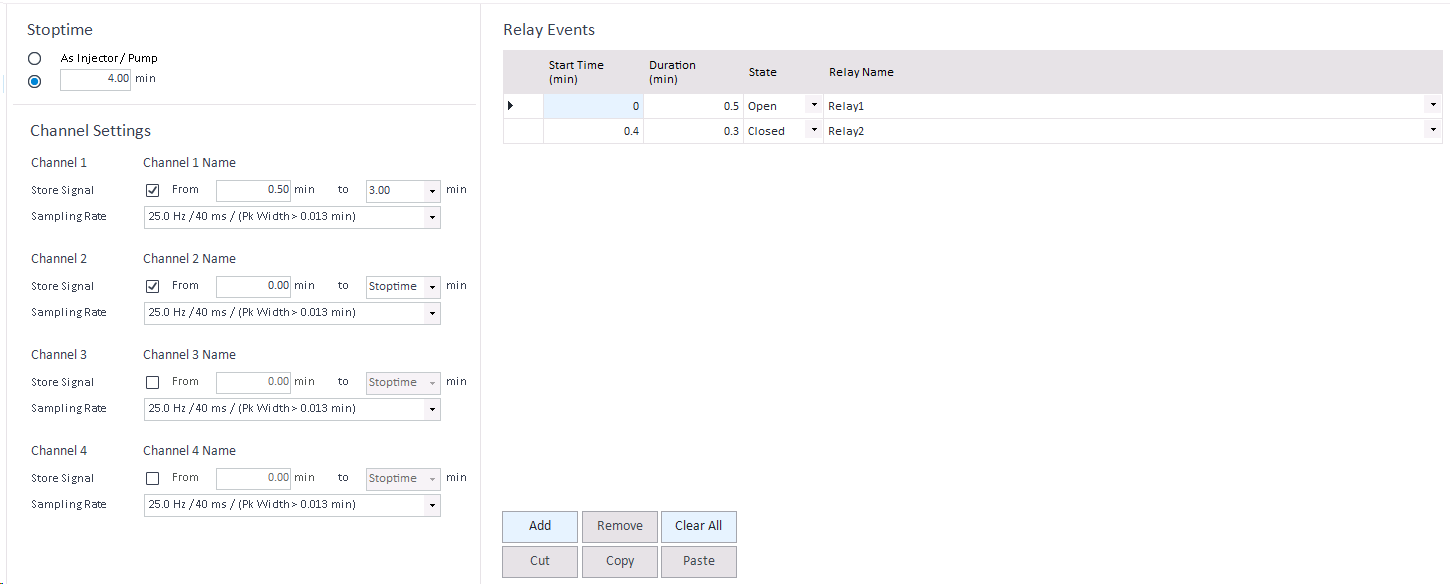
Enter the Stop Time in minutes for this device, or select As injector/Pump, if run time is specified by injector/pump.
For channel 1/2/3/4:
-
Set the check box on Store Signal to permit signal data collection on this channel.
-
Limit data collection of the particular channel by specifying From and To times in minutes. The default values for these fields will store the channel data for complete run time range.
Select a signal Sampling Rate between 0.1 Hz and 100 Hz from the drop-down list. Expected peak widths for each sampling rate are shown.
Table with available settings: See Sampling rates settings.
-
Add or edit Relay Events. If this method needs to control an external event, click the Add button on the Events table
- Enter an event Start Time in minutes. The event starts after the entered number of minutes into the run.
- Enter an event Duration in minutes. The relay is switched for the specified time to the given state.
- Select State the relay is switched to.
- Click Relay Name and select a relay from the list.
-
If needed, add or edit additional events. You can also cut, copy, paste, remove (delete), or clear all (delete all) events.
-
Save the method.
Subpages
base-id: 8823514251
id: 8823514251