Add iterative lines
Prerequisites
|
You can add iterative MS/MS lines as part of your sequence run. Iterative MS/MS lines allow you to build and refine precursor ion exclusion lists across multiple injections, optimizing the identification of compounds in complex samples by preventing redundant MS/MS acquisitions of the same precursors.
To add an iterative line, do one of the following:
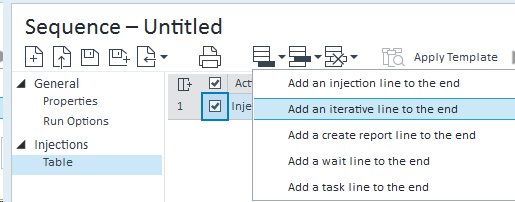
In the sequence table toolbar, click Add > Add an iterative line to the end to add an iterative line as the last line in your sequence.
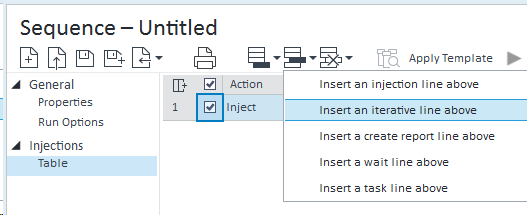
In the sequence table toolbar, click Insert > Insert an iterative line above to insert an iterative line above the currently selected line in the sequence.
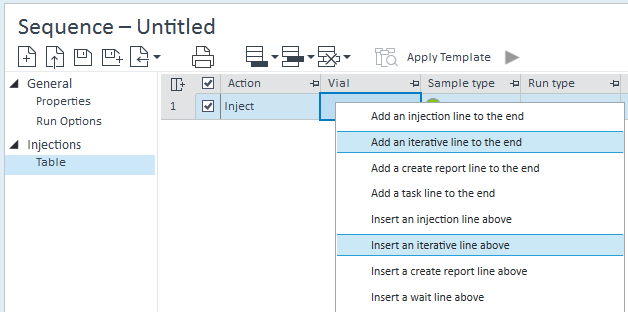
Right-click in the sequence table and select Add an iterative line to the end or Insert an iterative line above.
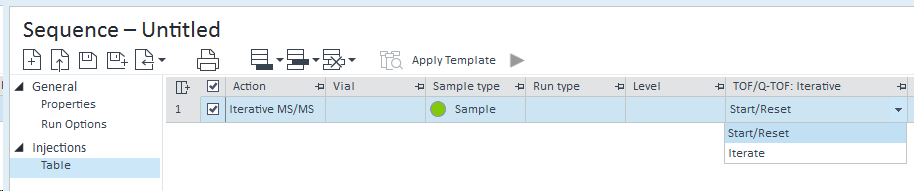
After adding an iterative line, the method override column TOF/Q-TOF: Iterative is shown in the sequence table. Choose the value Start/Reset or Iterate as required.
Activity Log entries are created for each iterative sequence line execution, with an appended i plus sample name as an identifier. For example:
base-id: 14100647051
id: 14100647051