Run Oligo Analysis
Prerequisites
|
In the Oligo Analysis Accelerator (OAA) web interface on the Data Selection tab, select the relevant project. If relevant, navigate to the required subfolder.
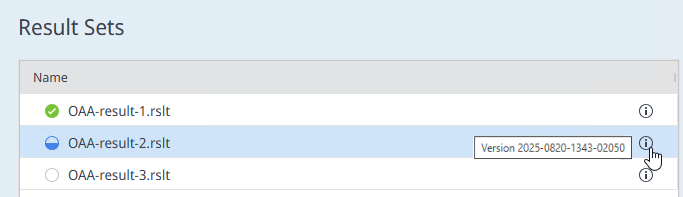
A status icon shows whether the Oligo analysis is completed, in progress, or not yet started.
The tool tip of the info icon shows the result set version.
-
In the content area, select the relevant result set.
If you use subfolders within your results folder: Ensure that your result set is located in the correct subfolder. Moving result sets to different paths after opening them in the OAA web interface is not supported.
Click Start.
The oligo analysis includes several steps. The upper navigation bar shows all steps, and highlights the one you are currently working on. You must complete one step before you continue with the next step.
A new oligo analysis starts with the step Initial Setup.

Proceed with Initial Setup.
NOTE
If you analyze a result set that has already been partially analyzed with a previous revision of Oligo Analysis Accelerator:
The behavior depends on which steps have been completed in the previous revision:- If you completed the Initial Setup step, your oligo analysis starts again with the step Initial Setup.
- If you completed the System Suitability or Ion Classification step, you must first reset your result set, then start a new oligo analysis.
- If you completed the Integration or Summary step, your oligo analysis starts again with the step Summary.
Subpages
base-id: 11123928715
id: 54043206652374667