Add/update MS compounds automatically
Data Analysis offers an Add/update MS compounds function that supports you in adding MS compounds to a processing method. To get the best results, apply it to a method with no existing compounds.
Privileges
|
Prerequisites
|
Load the scan data, and link it to a method that supports MS data (see MS method configurations).
Ensure that integration parameters are set up correctly. See Optimize integration of EIC or SIM peaks.
If MS Library search is relevant, set up library search. See MS library search.
-
Reprocess the injection.
All relevant peaks should now be integrated.
In the Compounds > Identification node of the processing method, select the Qualifier Setup tab.
Check the settings for qualifier ions. See Processing method: Compounds: Identification, Qualifier Setup tab.
If you have several injections, choose the relevant injection. In a calibration sequence, use an injection at mid-range.
Right-click the injection in the injection tree, then select Add/Update MS compounds.
OR: Right-click the chromatogram, then select Add/Update MS compounds.
OR: Right-click the compound table, then select Qualifier options > Add/Update MS compounds.
The application automatically analyzes the data as described here, and adds the corresponding information to the processing method.
-
In the Compounds > Identification node of the processing method, select the Compound Table tab.
Select the relevant compound. In the Qualifier group details window to the right of the compound table, check the parameters.
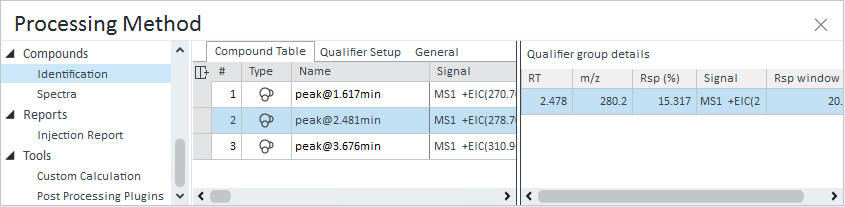
Check the required response ratio (Rsp (%) column) and the acceptable response window (Rsp window column), and adjust them as needed.
For details on the parameters in this window, see Processing method: Compounds: Identification, Qualifier group details.
Reprocess the results.
The qualifier parameters are used to generate the results.
See Also
base-id: 11017298443
id: 9007210272039435